How to play
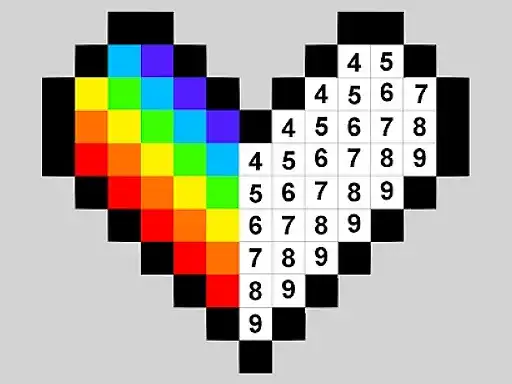
Color by Numbers is a pixel coloring puzzle where every picture is built from small square blocks, and each block carries a number that tells you which color belongs there. The developer states that you zoom in on each design, choose your colors, and put the correct color into each numbered square to reveal the finished pixel artwork. The workflow is simple from the first minute. You pick a color from the palette, then tap or click every block that matches the number shown on that color. Filled blocks change appearance so you can see your progress at a glance, and the picture slowly turns from a numbered grid into a recognizable image.
Start by scanning the picture for the blocks of one color. Jumping between colors slows you down and makes missed squares harder to spot. Zoom in when the blocks get small so you do not tap the wrong square, and zoom out when you want to see the overall shape emerging. If you fill a block with the wrong color, it will stand out against its neighbors, and you can usually correct it by selecting the right color and tapping the block again. Work steadily across one region at a time and the image will fill in without gaps.
There is no timer and no fail state in this type of coloring puzzle. The only goal is a completed picture, so you can take as long as you like on each design and stop whenever you want. A part-finished picture stays recognizable, which makes it easy to see where you left off when you come back.
Controls
The game is played with the mouse or with touch. On a desktop you move the cursor over the grid, click a color to select it with the mouse, and click each numbered block to fill it. The scroll wheel or the on-screen zoom control adjusts how close you are to the pixels, which matters a lot on detailed pictures with many small squares.
On a phone or tablet you tap colors and blocks directly with your finger, and pinch gestures handle zooming. Touch suits this game. Tapping a single square is a precise action even on a small screen. If a block seems unresponsive, zoom in first, because very small squares are easier to hit when the view is magnified. Rotate your phone to portrait or landscape depending on which fits the picture better, since the grid can be tall, wide, or square.
Levels and power-ups
The game is built around individual pixel designs. There are no numbered stages with increasing difficulty. Each picture is its own self-contained puzzle, and the developer’s description focuses on coloring numbered blocks to complete artwork, so treat every design as a fresh canvas. Because each design stands alone, you can pick a picture and work through it at whatever pace suits you.
Because coloring by number cannot be failed, there is nothing you need power-ups for. There are no enemies, no hazards, and no scoring pressure. The challenge is patience and accuracy. Nothing here rewards rushing. If you make a mistake, the fix is always the same, select the correct color and tap the block again. That makes this a calm choice among browser puzzle games, and it suits players who want to relax.
Tips and strategy
Most of these tips are general advice for color-by-number and pixel coloring games, so use the ones that fit how you like to work.
First, sort by color. Finish one color completely before moving to the next, and your eyes will learn where that number appears on the grid, which speeds up each pass. Second, use the edges. Blocks along the border of the picture are easier to identify, and coloring the outline first gives you a frame that makes interior blocks easier to judge.
Third, zoom before you tap on dense areas. Mis-taps cost more time than zooming does, especially when two similar numbers sit side by side. Fourth, work in sections. Pick a quarter of the picture, complete it, then move on, because finishing visible chunks is satisfying and helps you notice gaps early. A short check at the end of each section catches most mistakes.
Fifth, take breaks on large designs. Long tapping sessions can make your aim sloppy, and a one-minute pause resets your accuracy better than pushing through fatigue. Sixth, keep your hand away from the view when using touch, because a palm resting on the screen can select blocks you did not intend to fill. Finally, do not hunt for a single missing block for too long. Zoom out, scan for an empty-looking patch, and the stray square usually reveals itself against its completed neighbors.
About this kind of game
Color-by-number puzzles come from a long tradition that predates computers. Paint-by-number kits for hobby painters appeared decades ago, and the same idea migrated to pixel grids where every cell holds a number of its own. The digital version adds two advantages, instant correction of mistakes and automatic tracking of which blocks are done, which removes the most tedious parts of the hobby.
The mechanic shares DNA with other Japanese puzzle imports. Nonogram or picross puzzles reveal a hidden picture. Color by number removes the deduction and keeps the reveal, so the pleasure comes from watching an image emerge under your hands. That makes the genre a natural fit for children as well as adults, since it reinforces number recognition, color matching, and careful hand control without any penalty for getting something wrong.
Coloring games in general sit in the calm corner of the puzzle category. There is no leaderboard to chase and no run to protect, so the games work well in short sessions and as a way to unwind. The pixel art style also gives a clear sense of completion, because a finished grid is visibly full, with no ambiguity about when a picture is done. The educational tag attached to this genre is well earned, matching a number to a color and executing it precisely is a genuine exercise in attention.
Where and how to play
You can play Color by Numbers for free directly in your browser on OK Games, on desktop computers and on mobile devices. There is nothing to download and no account to create, so the whole process is opening the page and starting. The game itself loads only after you press Play, which keeps the page light until you actually want it. Start whenever you like.
If the site shows advertisements, they come from the game provider’s own player, so what you see there is handled by the provider. To get the best experience on desktop, use a mouse for tapping the blocks and keep one hand resting on the zoom control. On mobile, play in a comfortable position and lean on pinch zoom, because the most common frustration in this genre is tapping the wrong tiny square, and zooming solves it. Sessions can be as short as one small picture or as long as you like, since nothing forces you forward.
FAQ
Is Color by Numbers free to play?
Yes. It runs free in your browser with no download and no account required.
Does it work on phones and tablets?
Yes. The game is played with touch on mobile devices and with the mouse on desktop.
How do I know which color goes where?
Each block shows a number. Select a color from the palette and fill every block that carries its matching number, as the developer describes.
What happens if I color the wrong block?
Nothing bad. Select the correct color and tap the block again to fix it.
Is there a time limit?
No. Coloring puzzles like this are untimed, so you can complete each picture at your own pace.
Is it suitable for children?
The mechanics are simple, match numbers to colors and tap the blocks. It is a gentle, educational style of puzzle.
Do I need to zoom in?
Zooming is optional and often helpful. Detailed designs have small blocks that are much easier to tap accurately when the view is magnified.