How to play
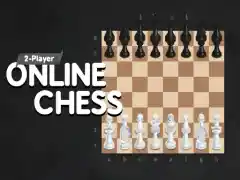
Chess Free is a browser version of standard chess. The developer states that the game includes a computer opponent powered by a strong engine, with eighteen difficulty levels that run from Beginner up to World Champion. You can also play against real live players online, and there is a mode for two people sharing the same screen. The rules are the ordinary rules of chess. You move your pieces, you try to checkmate the opposing king, and you avoid leaving your own king in danger. When you pick up a piece, the game shows you the squares that piece can legally move to. That display is helpful when you are still learning how each piece travels, and it also cuts down on accidental illegal moves during a fast game.
Because the engine covers a wide range of strength, the same game can feel like a gentle lesson or a serious test. You choose where to start.
Controls
The controls are simple. The developer states that you play with a mouse click or a tap. On a computer you click a piece, then click the square you want it to go to. On a phone or tablet you tap the piece and then tap the destination square. There are no key combinations to memorize and no controller to configure.
If you are used to dragging pieces across the board, clicking twice takes a little adjustment, but it is quick to learn. The interface also offers help while you play. The developer states that the game gives interactive tips on how to play better during the game, so advice appears as the position develops. If you make a move and immediately regret it, the developer states that you can cancel the move and go back, which is useful when you are experimenting with an idea you have not tried before.
Levels and power-ups
The main progression here is the difficulty setting. The developer states there are eighteen levels, from Beginner to World Champion, so you can move up gradually. The developer also states that you can choose a handicap, which changes the starting position or material so the sides are not equal. Handicaps are a common way to give a weaker player a real chance against a stronger one without pretending the game is even.
There are no power-ups in the usual arcade sense. Nothing on the board gives you extra moves, shields, or speed boosts. The assistance comes in the form of information and correction.
Here is what the developer states the game offers after and during play:
- An analysis after the game that highlights mistakes and shows how you could have played better
- The ability to replay the game from the right place, so you can return to the moment things went wrong
- Interactive tips during the game
- A saved rating in the online mode against live players
- Post game analysis in the online mode as well, so you can find your mistakes and improve
Tips and strategy
General advice for this kind of game applies here. In the opening, aim to control the center and get your pieces active before you start hunting for tricks. A move that develops a piece and protects your king at the same time is usually better than a move that does only one of those things. Castle early when you can, because a king stuck in the middle is a target for the rest of the game.
Before you commit to a move, look at what your opponent can do in reply. This single habit prevents more losses than any opening you could memorize. Ask what your opponent’s last move attacked, and whether any of your pieces are now undefended. If a piece is attacked and you cannot save it, look for a counterattack that creates a bigger threat.
Use the tools the game gives you. The move display tells you where a piece can legally go, but it does not tell you whether the move is good, so treat it as a map and not as advice. When you lose, run the analysis and read the mistakes instead of skipping past them. The replay feature is worth using on a game you lost badly, because seeing the turning point twice makes it stick. If you keep losing at one difficulty level, drop down a step, win a few games cleanly, and move back up. Handicap games are a fair way to play someone stronger than you without the result being decided before the first move.
About this kind of game
Chess is one of the oldest and most studied board games in the world. It is a game of complete information, both players see the whole board, and nothing is hidden. That means there is no luck to blame and no hidden card to draw. Every result comes from the moves that were played.
That also means chess rewards patience more than speed. Beginners often lose because they move too fast. Learning to slow down and check the position before each move is the single biggest improvement most new players can make. The game also has a long tail, the more you play, the more patterns you recognize, and the faster good moves come to mind. Playing against a computer at a fixed strength is a good way to build those patterns, because the opponent does not get tired and does not change style between games.
Where and how to play
Chess Free runs free in your browser on desktop and mobile. There is nothing to download and no account to create. The game loads only after you press Play, so the page itself stays light until you are ready to start. If ads appear, they come from the provider’s player, not from us.
Because it runs in the browser, you can start a game on a laptop and pick up the same kind of play on a phone later. The click and tap controls work on both. Nothing needs to be installed, and there is no sign up step between you and the board.
FAQ
Do I need to download anything? No. The game runs in your browser on desktop and mobile, with no download and no account.
Can I play against another person? Yes. The developer states that you can play against real live players online, and that there is a mode for two people sharing the same screen.
How strong is the computer? The developer states that the engine is powerful and that there are eighteen difficulty levels, from Beginner to World Champion.
What happens if I make a bad move? The developer states that you can cancel the move and go back.
Does the game help me improve? The developer states that it shows interactive tips during the game and gives an analysis after the game that highlights mistakes and shows better options.
Can I review an old game? The developer states that you can replay the game from the right place.
Is there a handicap option? Yes. The developer states that you can choose a handicap.
Is my rating saved online? The developer states that the rating is saved in the online mode against live players.