How to play
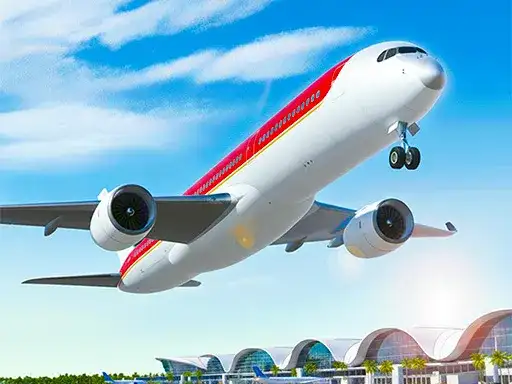
Airplane Simulator Game gives you one clear loop. You start at an airport, take off, cross the sky, and land safely at another airport. The developer states that you control powerful airplanes, fly through clouds and complete missions to reach your destination. There is no joystick and no cockpit panel to study before your first flight.
Your first job is getting off the ground. The aircraft begins on the ground, and the movement keys are what you use to steer it. Once you are airborne, the flight becomes a matter of pointing the plane toward the destination and keeping it steady. The developer states that the controls are easy and the environment is built to look good while you fly, so your attention belongs on the route rather than on instruments.
Each mission is a trip from one airport to another, which gives every flight a clear beginning and a clear end. Pay attention to the landing, because that is the moment that decides whether the trip feels complete. A controlled approach is worth more than a fast one. Do not expect a study-level simulation. With four direction keys and a mouse, the game is about steering the aircraft rather than managing systems.
Controls
The control set is compact. W or the Up arrow moves the aircraft front, S or the Down arrow moves it back, A or the Left arrow moves it left, and D or the Right arrow moves it right. Any button on the screen is clicked with the mouse. That is the full input list the developer gives.
Four directions cover the whole aircraft. W and S handle forward and backward movement, while A and D handle sideways movement. In practice, tap a key briefly and release it instead of holding it down. Short taps keep the plane stable. They also let you correct your line without building momentum that forces a bigger correction later.
The mouse is for menus and on-screen buttons, not for steering. If you have used arrow keys in a driving game, this layout will feel familiar quickly. Keep your hand relaxed, and you will stop thinking about the keys after the first flight. A desktop or laptop keyboard gives the most direct feel. On a mobile device, check how the on-screen buttons respond before starting a long flight.
Levels and power-ups
The developer describes a mission structure, you take off from one airport and land safely at another. That is the shape of a flight here, and it gives each trip a clear goal. Treat each flight as its own challenge rather than as a step in a long campaign.
Because the mission is the unit of play, progress comes from completing trips. The flight itself is the reward, a clean takeoff, a steady cruise and a safe landing. Watch how each route ends, since the landing defines the trip. That simplicity suits the genre. Flight games often work best when the goal is easy to state and the satisfaction comes from a clean touchdown rather than from a reward screen.
Tips and strategy
Plan the end of the flight before you are close to the airport. Rushing the final stretch is a common way to lose control, and it is avoidable when you start your approach early and leave room to correct. Give yourself space to line up and fix small errors while you still have height and time.
Use gentle inputs. Tap a direction key briefly, then release it. Holding a key builds momentum you then have to fight, and that fight is where crashes begin. Small corrections early prevent large corrections late. Watch the horizon and the ground below. A fixed reference point makes it easier to judge your height and angle, and clouds can hide that reference for a moment. Fly through them, then reorient once the view clears.
If you overshoot your line, do not slam the opposite key. Ease back with a few short taps. Overcorrection turns a minor mistake into a major one, and the aircraft responds better to calm hands than to sudden inputs. Practice one route until the landing feels routine. Repetition builds the timing you need, and the same habits carry over to every flight afterward.
About this kind of game
Flight simulators belong to the same broad family as driving games. You control a vehicle, you respect its momentum, and you learn to read the space around you. The appeal is handling something larger than yourself without any real-world risk.
Arcade-leaning simulators strip out the paperwork and give you the sensation of flight plus the tension of a landing without asking you to learn checklists or procedures. That makes them easy to pick up for a short session and easy to return to later. The goal is the feel of flight, not a perfect procedure. Landing is the skill that separates players in almost every flight game. It rewards patience, small adjustments and a willingness to go around and try again.
The genre also teaches a useful habit, look ahead. In a car you watch the road in front of you, and in a plane you watch the space you are about to fly into. That one habit improves every flight you make.
Where and how to play
Airplane Simulator Game runs free in your browser on desktop and mobile. Nothing to install and no account to create. The game loads only after you press Play, so nothing starts until you are ready.
Any ads you see come from the game’s own player rather than from this site. That is worth knowing if a screen appears before the game begins. A desktop or laptop gives the most direct control because the game is built around a keyboard, and a larger screen makes the sky and the ground easier to read. On a mobile device, check which input options appear before starting a long flight.
FAQ
What is the goal of Airplane Simulator Game? Take off from one airport, fly to another and land safely. The developer frames the game as a mission-based flight experience.
What are the controls? W or Up moves front, S or Down moves back, A or Left moves left and D or Right moves right. On-screen buttons are clicked with the mouse.
Do I need to download anything? No. The game runs in your browser, and no account is required.
Does it cost anything? No, it is free to play.
Can I play on my phone? Yes, the game runs on desktop and mobile in the browser. A keyboard gives the most precise control.
Are there levels or power-ups? The developer describes missions to different airports. Each flight is a trip with a takeoff and a landing.
Why does an ad appear before the game? Ads come from the game’s player, not from this site. The game starts only after you press Play.